Use Case: Keyword Extraction with Relevance Scores

Overview

This Node-RED flow automatically extracts keywords from a Censhare image asset using the Censhare AI Private server (e.g. vision model “gemma4:latest”), along with a relevance score for each keyword, and writes them back into the asset as linked keyword references in Censhare. It is a single-pass flow as it handles multiple values with relevance scores in one operation.

How the Flow Works

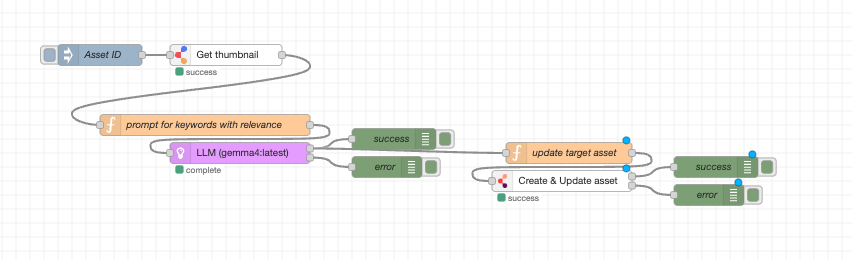
The flow runs sequentially in the following stages:

  1. Trigger - An Inject node fires with a Censhare asset-id

  2. Image Fetch - The asset thumbnail URL is retrieved from Censhare

  3. Prompt Build - A multimodal prompt is constructed instructing the LLM to extract up to 3 keywords with relevance scores (0–100)

  4. LLM Analysis - The image is sent to Censhare AI Private server using a vision model like “gemma4:latest”; the model returns a structured array of keyword/relevance pairs

  5. Payload Build - The function node builds two sets of Censhare payloads: one to create/register the keyword assets, and one to link them to the original asset with relevance scores

  6. Asset Update - All keyword assets and their links to the target asset are written to Censhare in a single create-update-asset call

Prerequisites

Requirement

Details

Censhare AI Private Server

Censhare AI Private Server Size S/M/L

Node-RED Modules

  • Censhare AI Node-Red nodes latest

  • Censhare Toolkit Node-Red nodes latest

Environment variables

AI_SOVEREIGN_API_URL

AI_SOVEREIGN_API_TOKEN

Censhare Asset

A valid asset with a thumbnail or preview storage item

AI Model

A vision model like “gemma4:latest” must be available on the configured AI server


Sample flow

keywords-extraction-with-relevance.png
Import Node-Red sample flow
JSON
[
    {
        "id": "4a95d36b89a70994",
        "type": "inject",
        "z": "9b3f21c2e88cfbe3",
        "name": "Asset ID",
        "props": [
            {
                "p": "assetId",
                "v": "21931",
                "vt": "num"
            }
        ],
        "repeat": "",
        "crontab": "",
        "once": false,
        "onceDelay": 0.1,
        "topic": "",
        "x": 380,
        "y": 160,
        "wires": [
            [
                "b31c194531e51193"
            ]
        ]
    },
    {
        "id": "b31c194531e51193",
        "type": "get-asset-file",
        "z": "9b3f21c2e88cfbe3",
        "name": "Get thumbnail",
        "assetId": "assetId",
        "idType": "msg",
        "storageKey": "thumbnail",
        "storageKeyType": "str",
        "expiration": "",
        "expirationType": "str",
        "x": 560,
        "y": 160,
        "wires": [
            [
                "aa01ed4bf0fd60a7"
            ]
        ]
    },
    {
        "id": "aa01ed4bf0fd60a7",
        "type": "function",
        "z": "9b3f21c2e88cfbe3",
        "name": "prompt for keywords with relevance",
        "func": "// temporary download url\nconst url = msg.payload;\n// vision model name\nmsg.modelName = \"gemma4:latest\";\n// system prompt as main instruction for the LLM\nmsg.systemPrompt = \"Act as an experienced image reviewer and provide the most matching results\";\n// prompt including image url\nmsg.content =  [\n        { \"type\": \"text\",  \"text\": \"Extract 3 keywords max and relevance score for each keyword between 0 to 100.\" },\n        { \"type\": \"image\", \"url\": url }\n];\nreturn msg;",
        "outputs": 1,
        "timeout": 0,
        "noerr": 0,
        "initialize": "",
        "finalize": "",
        "libs": [],
        "x": 530,
        "y": 260,
        "wires": [
            [
                "df92c15e894a1825"
            ]
        ]
    },
    {
        "id": "64f2b12ed9d2dfad",
        "type": "debug",
        "z": "9b3f21c2e88cfbe3",
        "name": "error",
        "active": true,
        "tosidebar": true,
        "console": false,
        "tostatus": false,
        "complete": "true",
        "targetType": "full",
        "statusVal": "",
        "statusType": "auto",
        "x": 790,
        "y": 320,
        "wires": []
    },
    {
        "id": "5a1158722bde90f8",
        "type": "function",
        "z": "9b3f21c2e88cfbe3",
        "name": "update target asset",
        "func": "const inputData = msg.payload?.keywords;\n\n// Safety check to ensure keywords array exists\nif (!Array.isArray(inputData)) {\n    node.error(\"msg.payload.keywords is missing or not an array\", msg);\n    return null;\n}\n// Safety check to ensure assetId exists\nif (msg.assetId === undefined || msg.assetId === null || msg.assetId === \"\") {\n    node.error('msg.assetId is missing', msg);\n    return null;\n}\n\n// 1. Build Keyword Asset objects (To create/define the keywords themselves)\nlet keywordAssets = inputData.map(item => {\n    return {\n        uniqueKey: { resourceKey: \"demoai:keyword.\" + item.keyword },\n        assetProperties: [\n            { traitName: \"type\", propertyName: \"type\", values: [{ value: \"module.keyword.\" }] },\n            { traitName: \"display\", propertyName: \"name\", values: [{ value: item.keyword }] },\n            { traitName: \"resource_asset\", propertyName: \"key\", values: [{ value: \"demoai:keyword.\" + item.keyword }] }\n        ]\n    };\n});\n\n// 2. Build Keyword Reference values (To link to the target asset with specific relevance)\nlet keywordReferences = inputData.map(item => {\n    return {\n        operation: \"CREATE\",\n        valueId: -1,\n        value: \"demoai:keyword.\" + item.keyword,\n        relevance: item.relevance\n    };\n});\n\n// 3. Build the Target Asset object (The asset receiving the keywords)\nlet targetAsset = {\n    uniqueKey: { assetId: msg.assetId },\n    assetProperties: [\n        {\n            traitName: \"category\",\n            propertyName: \"keywordRef\",\n            values: keywordReferences\n        }\n    ]\n};\n\n// 4. Combine: Create/Update keywords first, then link them to the target asset\nmsg.payload = {\n    assets: [...keywordAssets, targetAsset]\n};\n\nreturn msg;\n",
        "outputs": 1,
        "timeout": 0,
        "noerr": 0,
        "initialize": "",
        "finalize": "",
        "libs": [],
        "x": 1050,
        "y": 300,
        "wires": [
            [
                "40e54df20eae6762"
            ]
        ]
    },
    {
        "id": "40e54df20eae6762",
        "type": "create-update-asset",
        "z": "9b3f21c2e88cfbe3",
        "name": "Create & Update asset",
        "uniqueFeatureKey": "",
        "uniqueFeatureKey_type": "str",
        "uniqueFeatureValue": "",
        "uniqueFeatureValue_type": "str",
        "assetProperties": "",
        "assetRelations": "",
        "createIfNotExist": true,
        "updateIfExist": true,
        "includeAssetId": true,
        "enableSequential": true,
        "skipUpdateWhenNotRequired": true,
        "x": 1040,
        "y": 340,
        "wires": [
            [
                "01951de667687351"
            ],
            [
                "c23105dac7107266"
            ]
        ]
    },
    {
        "id": "01951de667687351",
        "type": "debug",
        "z": "9b3f21c2e88cfbe3",
        "name": "success",
        "active": true,
        "tosidebar": true,
        "console": false,
        "tostatus": false,
        "complete": "payload",
        "targetType": "msg",
        "statusVal": "",
        "statusType": "auto",
        "x": 1260,
        "y": 320,
        "wires": []
    },
    {
        "id": "c23105dac7107266",
        "type": "debug",
        "z": "9b3f21c2e88cfbe3",
        "name": "error",
        "active": true,
        "tosidebar": true,
        "console": false,
        "tostatus": false,
        "complete": "true",
        "targetType": "full",
        "statusVal": "",
        "statusType": "auto",
        "x": 1250,
        "y": 360,
        "wires": []
    },
    {
        "id": "0c9e7a9f522bb4ac",
        "type": "debug",
        "z": "9b3f21c2e88cfbe3",
        "name": "success",
        "active": true,
        "tosidebar": true,
        "console": false,
        "tostatus": false,
        "complete": "payload",
        "targetType": "msg",
        "statusVal": "",
        "statusType": "auto",
        "x": 800,
        "y": 280,
        "wires": []
    },
    {
        "id": "df92c15e894a1825",
        "type": "censhare-langchain-llm",
        "z": "9b3f21c2e88cfbe3",
        "name": "LLM",
        "awsBedrockConfig": "",
        "googleGCPConfig": "",
        "systemPromptType": "var",
        "modelType": "censhare",
        "typeOfmodelName": "str",
        "modelName": "gemma4:latest",
        "typeOfapiUrl": "env",
        "apiUrl": "AI_SOVEREIGN_API_URL",
        "typeOfapiKey": "env",
        "apiKey": "AI_SOVEREIGN_API_TOKEN",
        "platformType": "gai",
        "headers": {},
        "temperature": 1,
        "maxTokens": 1000,
        "typeOfsystemPromptVar": "msg",
        "systemPromptVar": "systemPrompt",
        "systemPrompt": "",
        "priority": 0,
        "maxRetries": 0,
        "outputFormat": "schema",
        "schema": "{\n  \"type\": \"object\",\n  \"properties\": {\n    \"keywords\": {\n      \"type\": \"array\",\n      \"items\": {\n        \"type\": \"object\",\n        \"properties\": {\n          \"keyword\": {\n            \"type\": \"string\"\n          },\n          \"relevance\": {\n            \"type\": \"number\",\n            \"minimum\": 0,\n            \"maximum\": 100\n          }\n        },\n        \"required\": [\"keyword\", \"relevance\"]\n      }\n    }\n  },\n  \"required\": [\"keywords\"]\n}\n",
        "checkOrPullModel": false,
        "keepAlive": 0,
        "convertUrlToBase64": false,
        "enableQueue": true,
        "think": false,
        "x": 580,
        "y": 300,
        "wires": [
            [
                "0c9e7a9f522bb4ac",
                "5a1158722bde90f8"
            ],
            [
                "64f2b12ed9d2dfad"
            ]
        ]
    },
    {
        "id": "9a7b11f1f263a9af",
        "type": "global-config",
        "env": [],
        "modules": {
            "@censhare/nodered-nodes": "1.0.0",
            "@censhare/node-red-contrib-censhare-toolkit": "1.0.22",
            "@censhare/node-red-contrib-censhare-ai": "0.1.1"
        }
    }
]

Sample LLM Output

Input: Image of a globe made of puzzle pieces with letters

JSON
{
  "keywords": [
    { "keyword": "Globe",   "relevance": 95 },
    { "keyword": "Puzzle",  "relevance": 85 },
    { "keyword": "Letters", "relevance": 75 }
  ]
}

Each keyword is then registered as a Censhare asset and linked to the original image asset with its relevance score.

Technical Implementation

The function node performs 3 operations in a single payload sent to Censhare:

Step 1 - Keyword Asset Creation: For each keyword, a keyword asset is built with type, display name, and a unique resource key:

JSON
{
    "uniqueKey": { "resourceKey": "demoai:keyword." + item.keyword },
    "assetProperties": [
        { "traitName": "type", "propertyName": "type", "values": [{ "value": "module.keyword." }] },
        { "traitName": "display", "propertyName": "name", "values": [{ "value": item.keyword }] },
        { "traitName": "resource_asset", "propertyName": "key", "values": [{ "value": "demoai:keyword." + item.keyword }] }
    ]
}

Step 2 - Keyword Reference with Relevance: Each keyword is linked to the target asset with its relevance score:

JSON
{
    "operation": "CREATE",
    "valueId":   -1,
    "value":     "demoai:keyword.Globe",
    "relevance": 95
}

Step 3 - Combined Censhare Payload: All keyword assets and the target asset update are merged into a single payload:

JSON
{
  "assets": [
    { "assetProperties": [ ...keyword asset 1... ] },
    { "assetProperties": [ ...keyword asset 2... ] },
    { "assetProperties": [ ...keyword asset 3... ] },
    {
      "uniqueKey": { "assetId": 229469 },
      "assetProperties": [
        {
          "traitName":    "category",
          "propertyName": "keywordRef",
          "values": [
            { "operation": "CREATE", "valueId": -1, "value": "demoai:keyword.Globe",   "relevance": 95 },
            { "operation": "CREATE", "valueId": -1, "value": "demoai:keyword.Puzzle",  "relevance": 85 },
            { "operation": "CREATE", "valueId": -1, "value": "demoai:keyword.Letters", "relevance": 75 }
          ]
        }
      ]
    }
  ]
}


Error Handling

The function node validates both msg.payload.keywords (must be a non-empty array) and msg.assetId before building the payload, halting gracefully with descriptive error messages if either is missing or invalid. The create-update-asset node has dedicated success and error debug nodes on its two outputs to ease error handling.

Notes

  • The flow is currently configured for asset ID. Update the Inject node to process a different asset

  • The prompt limits extraction to a maximum of 3 keywords: this can be adjusted in the prompt for keywords with relevance function node

  • Keyword assets are uniquely identified by the key format demoai:keyword.<keyword>. If the same keyword is extracted again for a different asset, the existing keyword asset is reused rather than duplicated