
The dataflow between an HCMS instance and a target application can be secured against failures in various ways. By design, it is secured through using multiple delivery servers, called satellites, bundled into groups, like on the diagram below:
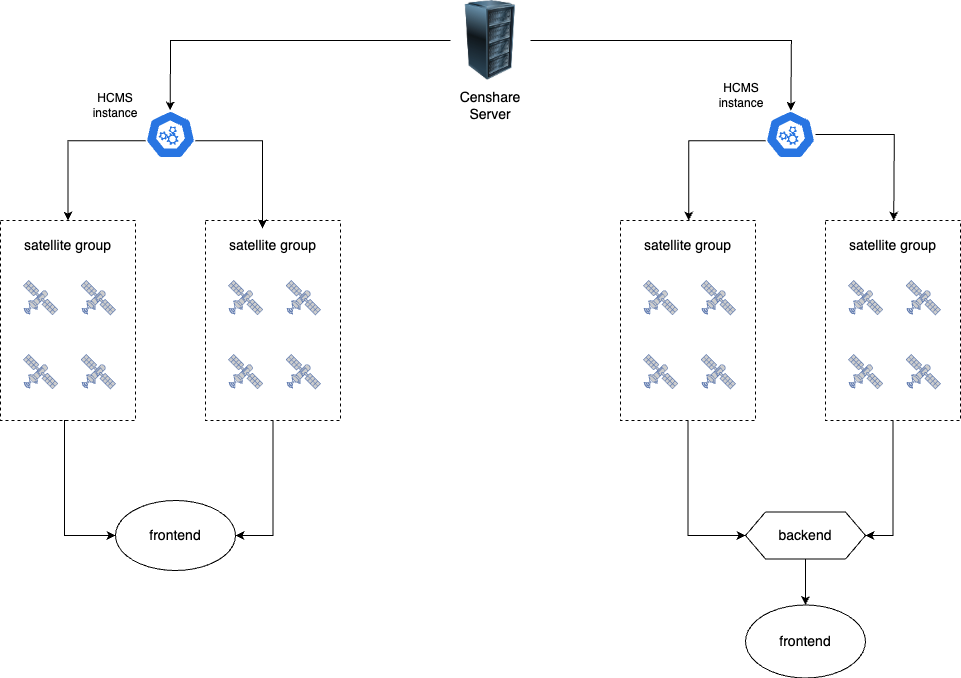
The number of satellite groups and satellites in the group can be as big as your project requires.
About HCMS satellites and satellite groups
A satellite group (cluster) is a group of satellites without unique IDs, bundled together. On the Censhare Server, they share the same asset as well as the same certificate. To distinguish between them, a random suffix is generated on start and changes with each new start respectively.
A satellite cluster is designed for scalability and robustness: if one satellite in the group or cluster fails, the others continue to serve data. A satellite group is created by default, even if you have only one satellite in it. However, it is highly recommended to run more than one satellite in each group.
Prerequisites
Before working with HCMS satellites and satellite groups, make sure you are familiar with the following topics:
-
HCMS First Steps: covers the initial setup of an HCMS instance, including creating the configuration asset.
-
HCMS Command Line Interface Tool: the CLI tool is used to register HCMS instances and manage satellite groups.
Satellite group and its purpose
How leader election and heartbeats work
Within a satellite group, one satellite acts as the leader. The leader runs the background daemons, such as change notifications. The other satellites only serve data.
Leadership is decided by a heartbeat. Each satellite regularly updates a shared cluster control asset. If the current leader stops updating it, another satellite takes over. This keeps the group available when the leader fails.
Sometimes several satellites update the shared asset at the same moment and briefly conflict. From version 5.3 on, each satellite spreads its heartbeats with a random delay and retries a conflicting update. The group then recovers on its own, without manual action.
You can tune the heartbeat interval, the jitter, and the retry behavior. See the Headless CMS configuration reference for the available cluster attributes.
How many satellites and/or satellite groups are optimal
Any production setup should have at least two satellites running. This ensures fault tolerance. Make sure all satellites do not run on the same hardware. Their VMs should be separated as well. A good setup would have everything running twice on two physical machines.
How many satellites you actually need depends mostly on the amount of traffic you expect and your cost constraints. The rule of thumb is the following:
If the CPU load (of one satellite) rises above 50%, consider adding another satellite. At 75%, it is definitely required.
You can add and remove satellites to the group at any time without any changes in the configuration. An orchestration platform like Kubernetes or AWS ECS will do it for you automatically.
Adding multiple satellite groups is helpful for serving data to different geographic regions. In such a setup, each geographic location should be covered by its own satellite group.
How to create and manage
When you register a new HCMS instance using the CLI tool, the "configuration create" command implicitly creates one configuration group as well as one satellite group, with basic essential configuration.
Updating configuration and satellite groups is possible using either the CLI tool, the Admin Client, or by accessing the XML assets directly.
Adding or removing satellites means starting or stopping Docker containers on the same or different servers or VMs. Exact steps depend on your setup:
-
Docker-based self-hosted: Run the Docker container (from the same image) on as many servers or VMs as the number of satellites you want to use.
-
Other self-hosting: Follow the same approach as for Docker-based self-hosted installations.
-
AWS-based and manually managed: Add new tasks to your ECS instance. One task represents one satellite.
-
Orchestration platforms (AWS ECS, Kubernetes, and others): These platforms can spin up and shut down satellites automatically, based on the current load and other parameters.
It is possible to deploy standalone single satellites without a satellite group, but this is not recommended.
It is also possible to move satellite groups between configuration groups. This must be done manually, using the CLI tool or the Admin Client. This is only necessary for self-hosted deployments.